
When a buyer opens your follow-up link three times in one evening, they are usually getting ready to take your offer to someone else, or checking it against another supplier's before a decision. The useful move is to look at which pages they spent time on, send something that answers the question those pages raise, and do it the next morning, without mentioning that you saw the opens at all.
That's the short version. The longer version depends on what else the data shows, so here's how to read it.
The old way: send the PDF and wait
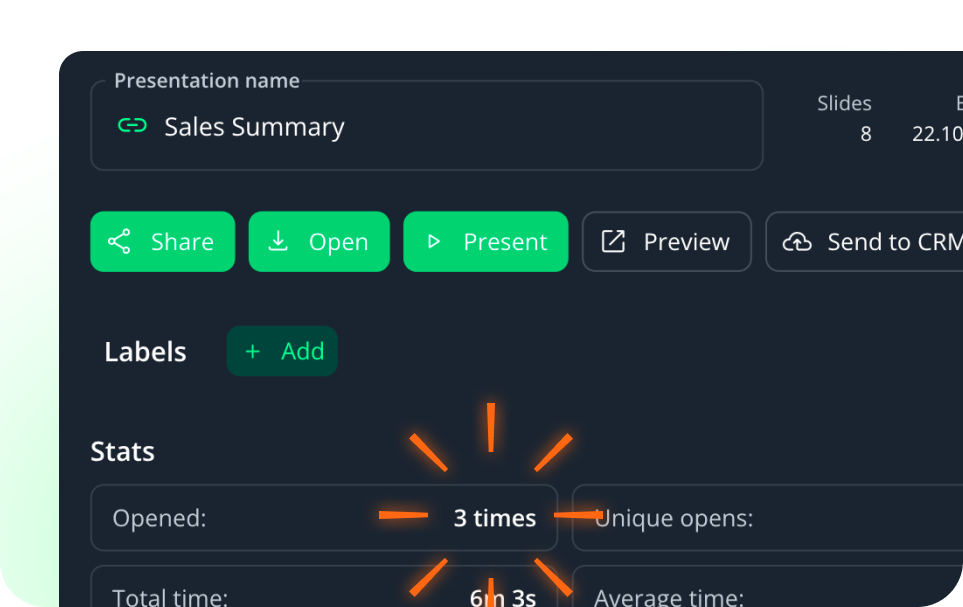
Most field reps still follow up the way they always have, a PDF attached to an email after the store visit or the buyer meeting, and then they wait to hear back, which in practice means waiting until the next visit or the next price negotiation, whichever comes first. Sure, the email went out, and the rep can tick the follow-up box in the CRM, but nobody knows whether the buyer read page one, page six, or nothing.
A trackable follow-up link changes that. A Salesframe follow-up link shows the rep who opened the shared materials, when they opened them, which pages they viewed, and how long they spent on each one.
So now you know things. Though, knowing something and knowing what to do with it are two separate skills, and most teams get the first one on day one and the second one a few months later (usually after a rep has sent a slightly awkward email).
What does it mean when a buyer opens a follow-up link several times?
Repeat opens from the same person in a short window almost always mean the buyer is working with your material, not just looking at it. The common reasons, from what we see in field sales teams:
They are preparing for an internal meeting, often a category manager getting ready to present listing options to a purchasing director the next day.
They are comparing your terms with another supplier's, flipping between two sets of materials.
They are checking a number they half-remember from your meeting, usually price, volume, or promotion timing.
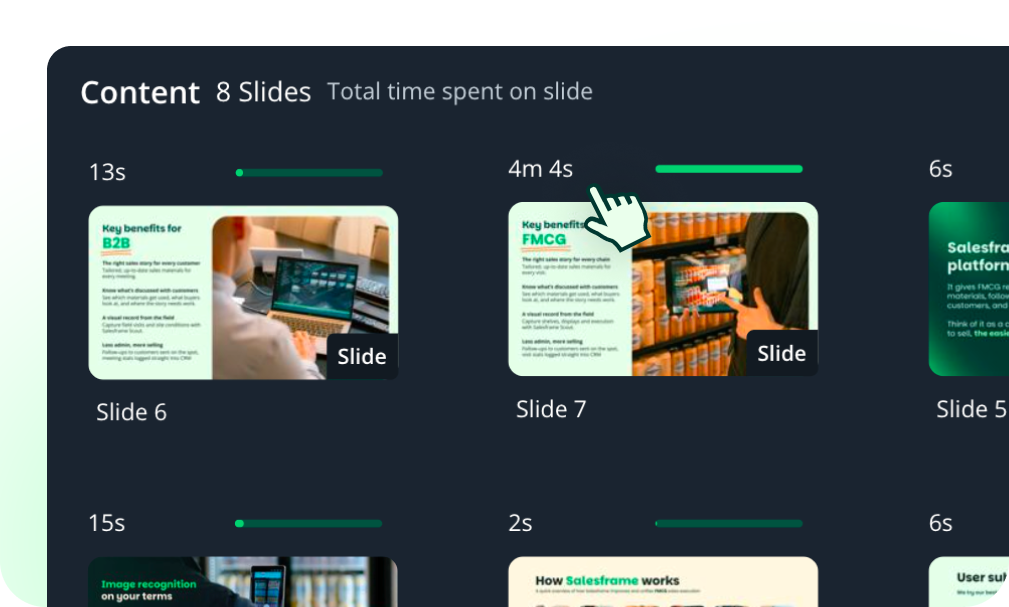
The page-level data tells you which of these you're dealing with. Four minutes on the pricing page points to a price question coming your way. Time on the promotion calendar suggests they're planning shelf space or campaign slots, and a long look at the display or planogram slide usually means someone is working out whether the thing fits in their stores, physically.
Late evening timing doesn't mean much on its own (buyers have inboxes too, and evenings are when a lot of them catch up). Combined with repeat opens and a clear focus on one or two pages, though, it's a reasonable sign that a decision or a meeting is close.
Which engagement signals matter, and what to do about each
Several opens from different people
Your contact has forwarded the link. You now have a buying group, and your contact is presenting your case in a room you're not in, so the most helpful thing you can do is give them better material to present with: a one-page summary, the volume or margin figure they'll be asked about, and a clear version of what you're asking for.
A long time on one page
Answer that page's question before it's asked. If the buyer spent most of their time on the listing fee breakdown, send a short note the next morning with the payback calculation per store format, framed as something you meant to include anyway.
One quick open, then nothing
Eight seconds on the cover page is a skim, and a skim isn't a no. Don't chase it hard. Bring the one relevant point up at the next scheduled contact instead of sending three reminder emails in a week.
No opens at all
Check the channel before you check the buyer. Store managers in particular spend most of the day on the shop floor, so an email link can sit unread for a week, while the same link sent as a text message gets opened before lunch. Salesframe lets reps send shared presentations by SMS, which is worth trying before assuming the buyer isn't interested.
Busy for a week, then silence
A link that gets opened repeatedly and then goes cold for two weeks or more usually means the deal has stalled internally, a budget question, a competing priority, or a decision-maker on holiday. A plain "checking in" message won't move much here, so bring something new: a result from a similar store, a change in promotion timing, or an updated offer.
Don't tell the buyer you watched them read it
Here's where engagement tracking goes wrong. A rep sees three opens at 22:40, gets excited, and opens the next call with "I noticed you looked at my presentation a few times last night," and the buyer, quite reasonably, feels watched.
Use the data to decide when to get in touch and what to send, and keep it out of the conversation. Compare these two messages:
"Saw you opened the proposal three times yesterday evening, any questions?"
"Following up on the autumn listing, here's the volume breakdown per store format in case it helps with your internal review."
The second one uses everything the tracking told you (the buyer is preparing an internal review, and volume is the open question) without making them feel monitored. The buyer just experiences a rep who sends the right thing at the right moment, which is the whole point.
Why the next morning beats the same night
The instinct is to reply immediately. Don't send anything at 23:00, because a message that lands while the buyer is still reading your proposal looks like you're watching the analytics dashboard (which, to be fair, you are).
Speed still matters, just at a normal hour. In a widely cited Harvard Business Review study, firms that responded to a lead within an hour were nearly 7 times as likely to qualify it as firms that waited longer (the study looked at inbound online leads, though the same logic holds for a buyer who is mid-decision). For an evening of repeat opens, the practical window is the next morning, before the internal meeting the buyer is probably preparing for.
What field sales managers can see across the team
One rep reading one buyer's opens is useful. A manager looking at the same data across 40 reps and 300 accounts sees patterns no single rep can, like which materials buyers read all the way through and which slides they skip every time, or which reps haven't sent a trackable follow-up in a month.
That team-level view tells trade marketing which content earns its place in the library and which content needs rewriting or cutting. We covered the admin side of this in more detail in Salesframe vs. gut feeling: how analytics replace guesswork in the field.
Managers can also set up automatic alerts. With Salesframe automations, viewing a specific material on a shared presentation can trigger an email to a named person, so a key account manager hears about a pricing page view without anyone checking a dashboard.
FAQ
How do I know if a buyer opened my sales follow-up?
Send the follow-up as a trackable link instead of an email attachment. A trackable link records each open, the time of the open, which pages were viewed, and how long the viewer spent on each page. A PDF attached to an email gives you none of this.
What does it mean when a buyer opens a follow-up link multiple times?
Repeat opens by the same person in a short time usually mean the buyer is preparing for an internal discussion or comparing your offer with another supplier's. The pages they spend the most time on show what the open question is.
How quickly should a field rep follow up after a buyer opens the link?
Within the next working morning, not the same night. Responding quickly at a normal hour helps, while replying minutes after a late-night open can make the buyer feel monitored.
Should I tell the buyer I saw them open my presentation?
No. Use engagement data to choose the timing and content of your next message, and leave the tracking itself out of the conversation.
What should I do if the buyer never opens the follow-up link?
Try a different channel before assuming a lack of interest. Store managers and on-trade buyers often miss email links during the working day and open the same link sent by SMS much faster.
Can I get notified when a buyer views a specific page?
Yes, in Salesframe. Automations can send an email to a named person when a chosen material is viewed on a shared presentation.
If your reps follow up with PDF attachments today, pick one chain account, send the next three follow-ups as trackable links, and look at what comes back before deciding anything else.
More on how follow-up tracking works in Salesframe: Send & Track.